
Python is a clear and powerful object-oriented programming language, comparable to Perl, Ruby, Scheme, or Java. In my last blog we have discussed the key features of python. Now we are going to dive into the programming concepts of python. In this blog we will discuss about data types used in the python
Data Types
Data types are the classification or categorization of data items. It represents the kind of value a particular variable can hold and tells what operations can be performed on that particular data.
Since everything is an object in Python programming, data types are actually classes and variables are instance (object) of these classes. The type of a variable in the python is decided by the type of value assigned to that variable.
Example:
# type() function is used to identify the datatype of variable or object.
>>> x = 10
>>> type(x)
<class ‘int’>
>>> x = 10.0
>>> type(x)
<class ‘float’>
>>> x = 5+8j
>>> type(x)
<class ‘complex’>
>>> x = ‘Mukesh’
>>> type(x)
<class ‘str’>
>>> x = [‘Mukesh’,’Kumar’]
>>> type(x)
<class ‘list’>
>>> x = (‘Mukesh’, ‘Kumar’)
>>> type(x)
<class ‘tuple’>
>>> x = {‘fname’:’Mukesh’, ‘lname’:’Kumar’}
>>> type(x)
<class ‘dict’>
>>>
Built-in data type of python are as follows:
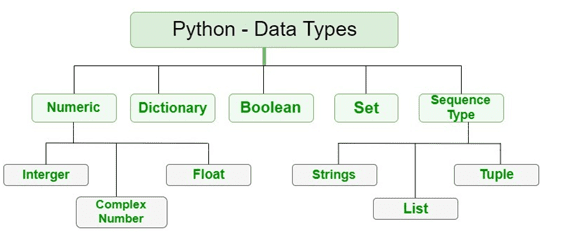
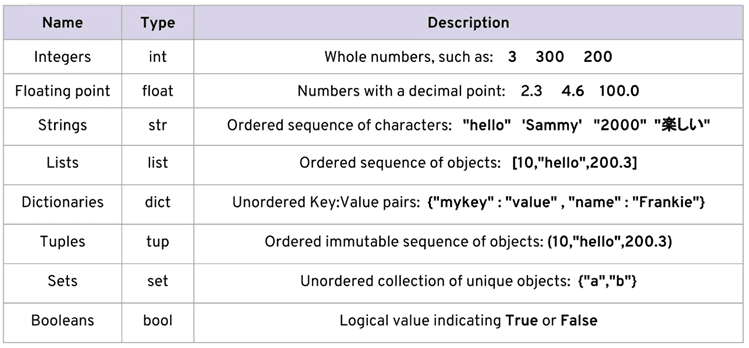
Let us discuss about Numeric Data type
Numbers
The Python interpreter acts as a simple calculator, You can write an expression and interpreter will display the value. Expression syntax is straight forward: the operators +, -, * and / work just like in most other languages (for example, Pascal or C); parentheses (()) can be used for grouping.
Examples
>>> 7 + 3
10
>>> 70 – 5*6
40
>>> (70 – 5*6) / 4
10.0
>>> 9 / 5 # division always returns a floating point number
1.8
There are three distinct numeric types: integers, floating point numbers, and complex numbers. In addition, Booleans are a subtype of integers.
Integers
This value is represented by ‘int’ class. It contains positive or negative whole numbers (without fraction or decimal). In Python there is no limit to how long an integer value can be.
Float
This value is represented by ‘float’ class. It is a real number with floating point representation and specified by a decimal point.
Complex Numbers
Complex number is represented by ‘complex’ class. It is specified as (real part) + (imaginary part)j. For example – 5+8j
Basic Operations on Numeric Type
The integer numbers (e.g. 2, 4, 20) have type ‘int’, the ones with a fractional part (e.g. 5.0, 1.6) have type ‘float’.
Division (/) always returns a float. To do floor division and get an integer result (discarding any fractional result) you can use the // operator; to calculate the remainder you can use %:
Examples
>>> 7+3 # addition operator
10
>>> 7-3 #minus operator
4
>>> 7*3 #multiplication operator
21
>>> 17 / 3 # classic division returns a float
5.666666666666667
>>>
>>> 17 // 3 # floor division discards the fractional part
5
>>> 17 % 3 # the % operator returns the remainder of the division
2
>>> 5 * 3 + 2 # result * divisor + remainder
17
With Python, it is possible to use the ** operator to calculate powers
>>> 5 ** 2 # 5 squared
25
>>> 2 ** 7 # 2 to the power of 7
128
The equal sign (=) is used to assign a value to a variable. Afterwards, no result is displayed before the next interactive prompt:
>>> width = 20
>>> height = 5 * 9
>>> width * height
900
If a variable is not “defined” (assigned a value), trying to use it will give you an error:
>>> n # try to access an undefined variable
Traceback (most recent call last):
File “<stdin>”, line 1, in <module>
NameError: name ‘n’ is not defined
There is full support for floating point; operators with mixed type operands convert the integer operand to floating point:
>>> 4 * 3.75 – 1
14.0
In interactive mode, the last printed expression is assigned to the variable _. This means that when you are using Python as a desk calculator, it is somewhat easier to continue calculations, for example:
>>> tax = 12.5 / 100
>>> price = 100.50
>>> price * tax
12.5625
>>> price + _
113.0625
>>> round(_, 2)
113.06
This variable should be treated as read-only by the user. Don’t explicitly assign a value to it — you would create an independent local variable with the same name masking the built-in variable with its magic behavior.
All numeric types (except complex) support the following operations:
| Operation | Result | Full documentation |
| x + y | sum of x and y | |
| x – y | difference of x and y | |
| x * y | product of x and y | |
| x / y | quotient of x and y | |
| x // y | floored quotient of x and y | |
| x % y | remainder of x / y | |
| -x | x negated | |
| +x | x unchanged | |
| abs(x) | absolute value or magnitude of x | abs() |
| int(x) | x converted to integer | int() |
| float(x) | x converted to floating point | float() |
| complex(re, im) | a complex number with real part ‘re’, imaginary part ‘im’. im defaults to zero. | complex() |
| c.conjugate() | conjugate of the complex number c | |
| divmod(x, y) | the pair (x // y, x % y) | divmod() |
| pow(x, y) | x to the power y | pow() |
| x ** y | x to the power y |
https://www.itsengg.edu.in/blogs/post/data-types-in-python-numeric-data-type
 ITS Engineering College